How to Solve Vlog Background Music & Copyright Issues with ToMusic
For content creators, finding the perfect background music is often the most frustrating part of the editing process. You spend hours scrolling through stock libraries only to find tracks that sound generic, or worse, you find a great song only to get hit with a copyright claim or demonetization on YouTube and TikTok.
Fortunately, AI is changing the game. We have moved beyond simple stock loops to advanced Text to Song technology. This innovation allows you to describe exactly what you hear in your head and turn it into reality, solving both the creative block and the legal headaches in one go.
What is ToMusic Vlog Music Generator
ToMusic.ai is a cutting-edge platform that functions as a specialized ai music generator from text. While it offers various modes, its specific “Vlog Music” feature is a lifesaver for video creators.
Unlike traditional stock music sites where you search for existing tracks, ToMusic.ai builds audio from scratch based on your input. This ensures that the music is not only unique to your specific video content but also free from the copyright strikes that plague creators using commercial music.
How to Generate Your Vlog Music
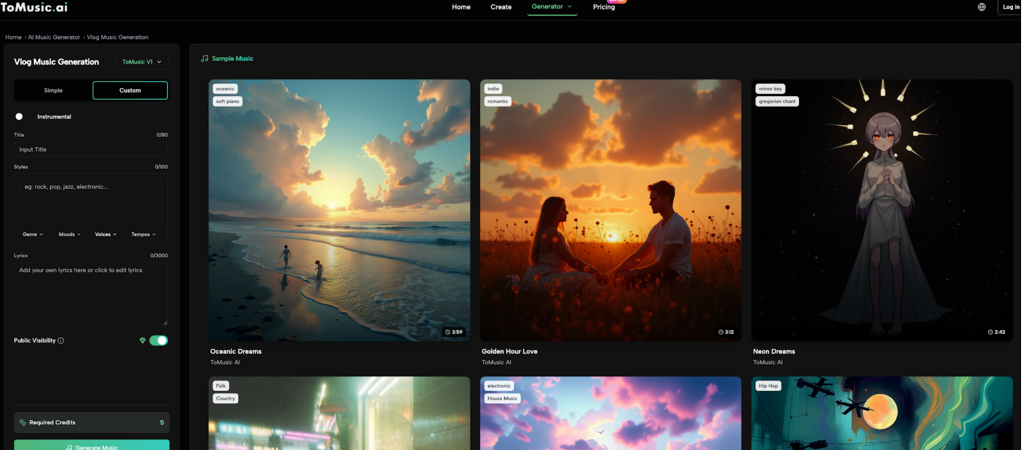
Based on the interface, creating a professional soundtrack is intuitive. Here is how you can use the Text to Music capabilities to generate a track in seconds:
2. Select Your Mode
Navigate to the “Vlog Music Generator” section. You will see options to toggle between “Simple” and “Custom” styles.
- Pro Tip: For background music, ensure you select the Instrumental (器乐) toggle shown in the interface. This ensures the track doesn’t have vocals that clash with your voiceover.
- Enter Your Title and Prompt
- Title: Give your track a name in the title box so you can save and organize it later.
- The Prompt: In the text input box, describe the vibe you need. For example: “Upbeat energetic travel music for a summer vlog” or “Lo-fi chill beats for a study with me video.” This is where the ai music generator from text engine analyzes your words to compose the melody.
3. Refine with Style Tags
As shown in the advanced settings, you don’t need to be a music theory expert. You can simply select tags to guide the AI:
- Genre: Choose from popular styles like Pop, K-Pop, J-Pop, Electronic, House, or EDM.
- Mood: Define the emotional tone (e.g., Chill, Happy, Melancholic).
- Rhythm: Adjust the tempo to match your video’s editing speed.
4. Generate
Once your settings are dialed in, check the credit cost (e.g., 5 credits) and click the large green Generate Music button. The AI will compose your unique track instantly.
Why Use an AI Music Generator?
Why switch from traditional libraries to ToMusic.ai?
100% Copyright Safety
The most significant advantage of using ToMusic is the elimination of legal risk. In the current digital landscape, copyright strikes are a creator’s worst nightmare. Traditional “Royalty Free” music can sometimes still trigger Content ID claims if the license is ambiguous or if the original artist changes their terms. However, since the music on ToMusic is generated note-by-note by AI based on your unique prompt, the resulting audio file is entirely original. It has never existed before the moment you clicked “Generate.” This uniqueness means the audio fingerprint does not exist in copyright databases, allowing you to monetize your videos on YouTube, Instagram, and TikTok without fear of takedowns or revenue loss.
Precise Content Matching
Stock music libraries operate on a “one size fits all” model. You might find a track that has the right beat but the wrong instrument, or the right mood but the wrong tempo. With Text to Music prompts, you have granular control over the output. You can tailor the genre, mood, and rhythm to fit the exact pacing of your video.
- Need a high-energy Electronic track for a fast-paced tech review?
- Need a slow, sentimental piano piece for a cinematic travel montage?
- Need a quirky, upbeat rhythm for a cooking tutorial? By combining specific keywords and style tags, you ensure the music enhances your storytelling rather than distracting from it.
Efficiency and Speed
Time is a creator’s most valuable resource. The traditional method of finding music involves “doom scrolling” through thousands of tracks on stock websites, listening to 10 seconds of a song, realizing it doesn’t fit, and repeating the process for hours. ToMusic creates a workflow shortcut. You simply type a prompt describing what you need, click a button, and get a result in moments. If the first result isn’t perfect, you can slightly tweak your prompt and regenerate immediately. This rapid iteration cycle allows you to finalize your audio 10x faster than traditional searching.
Variety and Sonic Identity
Finally, using an ai music generator from text allows you to build a unique sonic identity. If you use popular stock music, there is a high chance your audience has heard that same track on five other channels. This dilutes your brand. The generator covers a massive range of styles, from “Electronic Dance” to “Dazed” ambient tracks, ensuring your content sounds fresh. You can experiment with fusion genres (like “Cyberpunk Jazz” or “Acoustic EDM”) that might be hard to find in standard libraries, giving your vlogs a distinctive edge that stands out in a crowded feed.
Conclusion
Music shouldn’t be the bottleneck in your creative process. With the ToMusic.ai Vlog Music Generator, you can stop worrying about legal issues and generic soundtracks. By leveraging Text to Song technology, you can create custom, copyright-safe background music that elevates your content and keeps your channel safe.
Give it a try for your next upload—your editing timeline (and your peace of mind) will thank you.