Turn Your Ideas into Melodies: A Beginner’s Guide to AI Music with Musick AI
Music ideas often arrive at unexpected moments—a phrase, a mood, or a rhythm that feels too good to lose. Musick AI turns those fragments into full songs by letting anyone describe a style, choose a voice, and generate complete tracks in just a few steps. To try it directly, beginners can start from the AI Music Generator and experiment with short descriptions instead of complex music theory.
I. Understanding What Musick AI Actually Does
Musick AI works as an AI Music Maker that converts short text prompts into structured songs with melodies, harmonies, and vocals. It can create music in many genres—from EDM and R&B to jazz, classical, and country—so beginners are not locked into one sound. The site also emphasizes that its music library is built with consent and clear copyright rules, so tracks can support projects without unexpected rights issues when used under the proper license.
1. Any-genre song creation
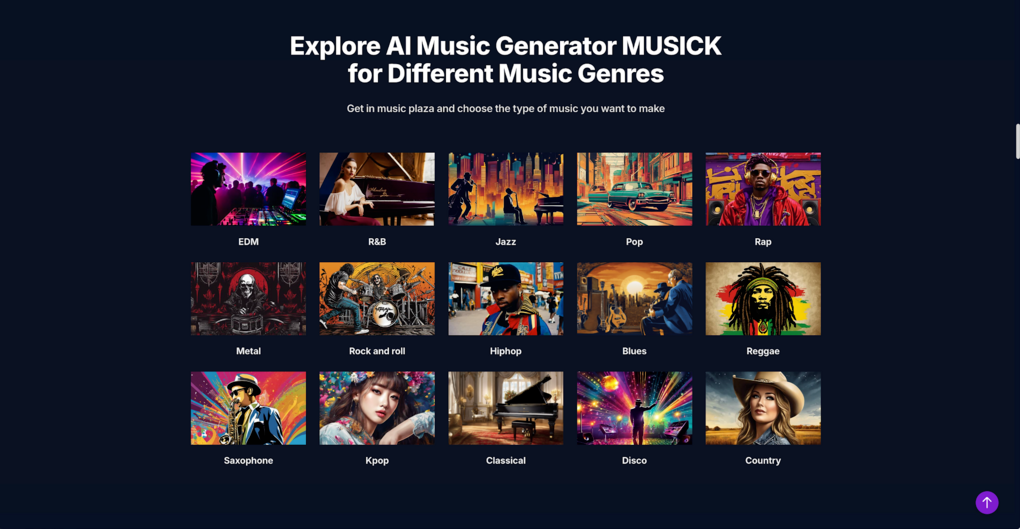
Musick AI can generate tracks in EDM, R&B, Jazz, Pop, Rap, Metal, Rock and roll, Hiphop, Blues, Reggae, Saxophone-focused pieces, Kpop, Classical, Disco, and Country, among others. This range helps beginners explore styles they may not usually play, such as mixing hiphop drums with jazz chords or blending Kpop energy with acoustic elements. A wide catalog of genre examples on the site makes it easier to understand how each style typically feels before writing a prompt.
2. From idea to full composition
Instead of building a song track by track, users type what they want—such as “acoustic pop about the holidays”—and Musick AI handles melody, harmony, and arrangement. The system can create instrumental pieces or full songs with vocals depending on the settings chosen in the Generate Music panel. This is especially helpful for people who can imagine mood and story but do not yet play instruments or know how to produce.
3. Emotionally rich, ready-to-use audio
The official description highlights that Musick AI focuses on high-quality, emotionally rich music suitable for uses like YouTube content, films, podcasts, games, education and more. Users can build song formulas that work for recurring needs—such as a familiar intro theme for every video episode. Once generated under the appropriate plan, tracks can be downloaded as MP3 files to drop directly into editing software.
II. Simple Workflow: From Idea to Download
Beginners often benefit from a clear, repeatable process. Musick AI outlines a straightforward workflow that anyone can follow.
1. Describe, generate, and listen
The basic rhythm is: input a description, click Generate, then listen to the output. The pop generator page summarizes this as “Input Your Description and Wait for Musick AI Pop Music Generator Processing” followed by checking whether the composition matches what was intended. If not, adjusting the prompt with clearer genre, mood, or instruments usually improves the next version.
2. Adjust prompts using tags and moods
Musick AI encourages users to experiment with different tags, moods, and styles to “create soundtrack for your project.” For example, a prompt can mention “calm, lo-fi hiphop with soft piano and vinyl noise for late-night studying” to get more specific results. Details such as structure (intro, verse, chorus, bridge, outro) and approximate tempo can also be added when a project demands consistent pacing.
3. Save and organize created tracks
After generating a song, users can save it in the “My AI Music” section and download eligible tracks for use in video editors or audio workstations. The site also lets users mark favorites and build a personal repository, which is helpful for recurring use in series, courses, or podcasts. Because the generator supports commercial license options, these tracks can form the backbone of a library for long-term creative work when the terms are followed correctly.
III. Extra Creative Tools Inside Musick AI
Beyond the main generator, the site lists several additional tools that extend what beginners can do with their music ideas.
1. AI Song Lyrics Generator
The AI Song Lyrics Generator accepts input about music genres and produces lyrics and musical notes tailored to that style. Beginners who struggle with writing words can use this as a starting point, then edit lines to match their personal story. It is especially useful when combined with the main AI Song Maker process, where those lyrics can be turned into a complete track.
2. AI Beat Producer and AI Rap Generator
The AI Beat producer allows users to write down melody notes and have them turned into structured beats. The AI Rap Generator, meanwhile, supports designing music sheets or playlists and then selecting genres for rap-focused tracks. Together, these tools help users interested in rhythmic music—like hiphop or trap—build instrumentals without manual drum programming.
3. Mood templates and multi-scenario support
Musick AI mentions “many mood templates” and describes itself as suitable for use cases such as YouTube, filmmaking, podcasting, game development, education, and even therapy-oriented playlists. Beginners can pick moods—uplifting, calm, intense—and pair them with genres to fine-tune atmosphere for each project. Because the tool is designed for multi-scenario use, a single account can support very different needs, from energetic channel intros to gentle sleep music.
IV. Practical Tips for Better AI Music Results
Knowing how Musick AI works is helpful, but practical habits make the biggest difference for people just starting out.
1. Start short and focused
Short prompts with clear intent often outperform long, vague descriptions. A beginner might start with “gentle piano and strings for a reflective moment, slow tempo” rather than several paragraphs of story. Once the base tone feels right, extra details such as structure or specific instruments can be added in later prompts.
2. Match genre to project purpose
The genre information on the site can guide genre choices. For example, corporate explainers often work well with soft pop or light electronic music, while game streams might benefit from EDM or rock. The ability to generate many genres with one AI Music Maker allows newcomers to test different directions without hiring multiple composers.
3. Use reference ideas without copying artists
Musick AI suggests using genres and vibes instead of naming specific artists or songs. A description like “moody alternative rock with echoing guitars and atmospheric pads” communicates style clearly without direct imitation. This approach keeps creations original while still staying close to the emotional territory a listener might expect.
4. Iterate and save variations
Because generation is fast, beginners can create several versions of the same idea, changing only a few words in each prompt. Naming files with both project and mood (“TravelVlog_Energetic_01”) makes it easier to revisit favorites later. Over time, this builds a reusable library that reflects the creator’s own taste rather than random presets.
V. Where AI Music Fits in Real Projects
For many readers, the main question is not whether AI can make music, but how it fits into everyday work. Musick AI provides use-case guidance throughout its site.
1. Content creators and brands
The home page notes that Musick AI is suitable for YouTube, Instagram, Facebook, LinkedIn, Twitter and other channels where copyright-safe background music is important. Creators can generate recognizable intro themes, looping background tracks, or transitions tailored to their audience. Brand managers can craft jingles and musical motifs that align with campaign moods without scheduling studio sessions.
2. Educators, students, and high school productions
Musick AI highlights that it can craft pieces for high school musical students and teachers. Teachers may use it to demonstrate song structure or harmony, while students can quickly prototype ideas for performances. Because the generator can produce fragments and full pieces, it also supports exercises in arranging and lyric writing.
3. Personal projects and wellbeing
The site mentions use in entertainment and therapy, including building repositories of favorite tracks to “cure unhappiness.” Users can create playlists tuned to specific feelings—relaxation, motivation, reflection—and keep them ready for daily routines. This makes AI Music not just a production resource but also a tool for everyday listening and mood management.
VI. Conclusion: A Practical Starting Point for AI-Powered Music
For anyone with musical ideas but limited production skills, Musick AI offers a practical, guided way to turn descriptions into full songs, instrumentals, and soundscapes. By combining clear text prompts, genre exploration, mood templates, and focused tools like the lyrics generator and beat producer, the site functions as an accessible AI Music Generator that can support everything from hobby projects to professional content. With thoughtful prompts, a bit of experimentation, and attention to project goals, beginners can quickly build a personal catalog of tracks and discover how AI-assisted composition fits naturally into their creative routine.